Understand your Salesforce org,
and safely change it.
Deplo is a free side panel inside Salesforce Setup. Run SOQL, diff who can touch a field, and trace what references a flow, all on your own session, nothing shipped to a server. Writes are a separate, consent-gated mode that always asks first and snapshots the prior values, so any change is one click from restored.
Works in any Salesforce org · the direct tools need no OAuth, no admin setup, no account
Free
core admin tools
Your session
runs as you, in your org
Read-only
by default, writes ask first
~30 sec
install, no setup
The everyday grind
Setup wasn't built for the day-to-day.
Half an admin's day is tab-hopping, exporting to spreadsheets, and one-by-one edits that should take seconds. Deplo collapses those into a panel that's already open on the page you're looking at.
"Where is this even used?"
Chasing a field, picklist, or automation across Setup tabs to figure out if it’s safe to touch.
Export, paste, repeat
Pulling a SOQL result into a spreadsheet just to grab two columns and share them.
Death by one-at-a-time
Deactivating picklist values, reassigning records, or flipping automations one tedious click at a time.
What's in the panel
A toolkit, not a single trick.
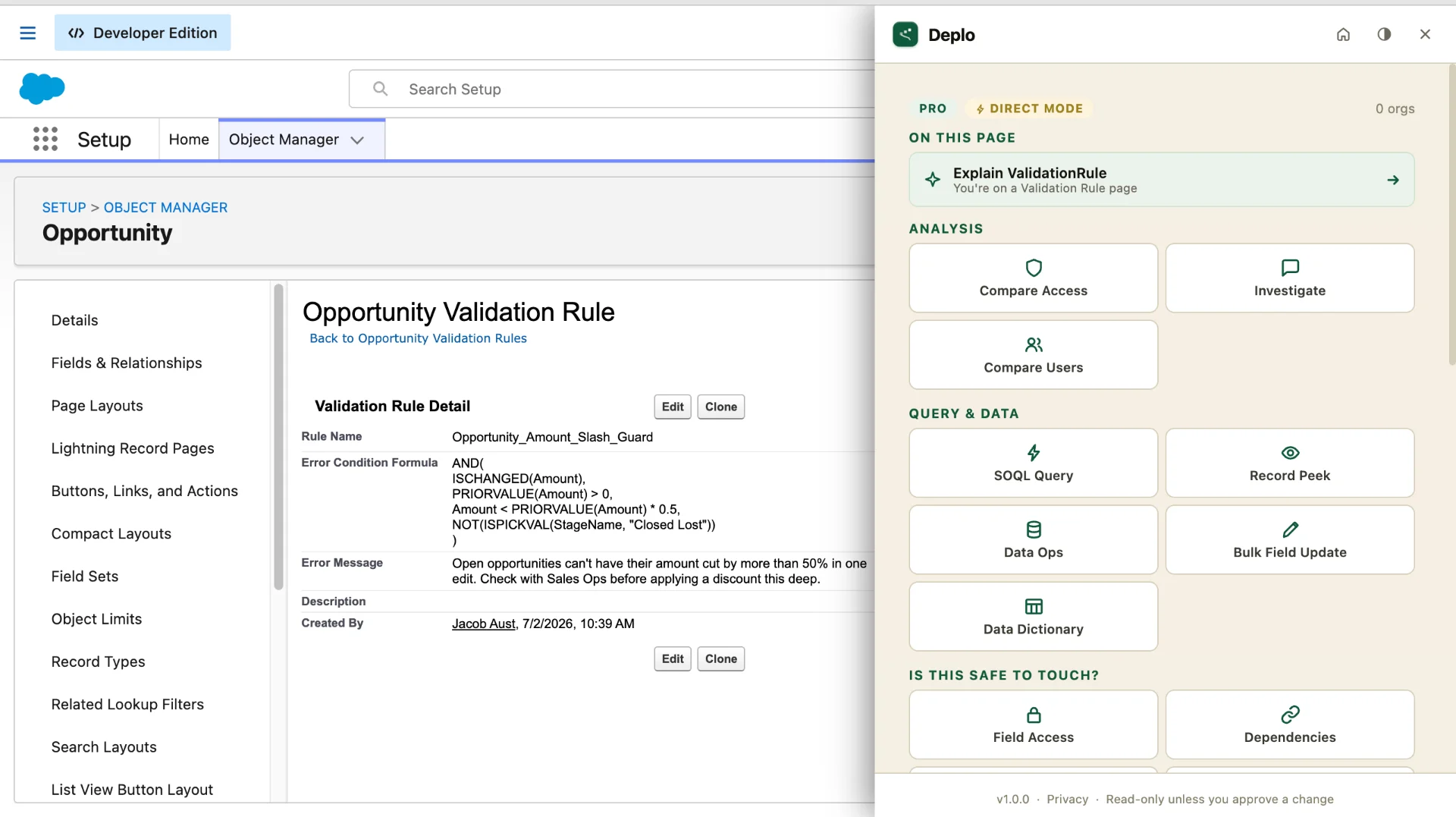
Every tool runs on your current org, in your own session. The read tools are free and never modify anything. The few that can change your org are clearly marked and always ask first.
SOQL runner
Query any object, open records inline, and copy or export results. Pick exactly the columns you want for CSV/Excel.
Compare Access
Diff two profiles or two users across permissions, field access, and object access: the five-dimension diff Setup won’t give you.
Field & Picklist Usage
See what percentage of records actually populate a field, and which picklist values are real vs. dead weight.
Custom Settings & Metadata
Read and edit hierarchy/list custom settings and custom metadata records in place, with one-click restore on edits.
Automation Inventory & Maintenance Mode
See every flow, validation rule, and workflow on an object, and safely toggle them off and back on for a deploy.
Reassign Records
Bulk-reassign ownership by object, or offboard a user across every object, with a preview and a snapshot to undo.
Picklist Values
Add and deactivate picklist values, and edit global value sets, without round-tripping through metadata. One-click restore on anything you change.
Dependency Explorer
Trace what references a field, class, or flow (including runtime references) before you change or delete it.
Record Peek & Reverse Trace
Inspect every field on a record, or trace a value back to where it came from, without leaving the page.
"Free" tools run entirely on your Salesforce session and only read. "Assisted" tools can change your org, and never do it without an explicit, scoped confirmation.
See It in Action
The side panel, at work.
Real screenshots from a live org. No mockups.
Stuck on a flow?
Just ask the AI.
Every tool above is free, forever. Pro adds one thing: an AI that reads your org's real Apex, flows, and fields by name, so you stop pasting into a generic chatbot that's only guessing at your setup.
AI calls send only the metadata you’re acting on (never bulk record data) to Deplo’s API and Anthropic’s Claude. No training on your data, brief retention, hard monthly caps. How AI calls work →
- ✓
Explain it in plain English
Point at a flow, validation rule, or Apex class and get a clear summary, with the edge cases and gotchas called out.
- ✓
AI SOQL builder
Describe the query in words; get valid SOQL checked against your org's real schema.
- ✓
AI Formula Helper
Draft validation rules and formulas from your org's actual fields, not generic boilerplate you have to rewrite.
- ✓
Investigate
Ask anything about your org and get answers grounded in its own metadata.
The promise
Reads freely. Writes only with your OK.
Most "admin power tools" can quietly change your org the moment you click. Deplo is built the other way around: nothing is modified unless you explicitly confirm it, and you can always put it back.
Read-only by default
Every tool starts read-only. Write actions are a separate, clearly-labeled mode.
You’re always the actor
Changes run on your own Salesforce session, under your permissions, never a hidden service account.
Scoped consent
Confirmation friction matches blast radius: a single-field edit is quiet; a 200-record reassign asks clearly.
One-click restore
Edits snapshot the prior values, so any change is reversible from the panel.
Writes default to sandbox & developer orgs; production stays read-only until you opt in. The brand promise in one line: Deplo never changes your org behind your back.
How it works
Install. Open. Done.
Add to Chrome
One click from the Chrome Web Store. No account, no OAuth, nothing to configure for the core tools.
Open it in Salesforce
Pin the extension and open the side-panel from any Salesforce tab. It recognizes the org and page you’re on.
Run a tool
Pick a tool, run it against your current org on your own session. Reads are instant and free; writes confirm first.
Why Deplo
How admins handle this today.
Raw Setup + spreadsheets
Free, but slow
- Tab-hopping for every answer
- Export-to-Excel for anything shareable
- One-at-a-time edits
Generic data extensions
Powerful, risky
- Fast SOQL + record access
- Writes fire instantly, no guardrails
- No admin-specific tooling
Deplo
Free core + safe writes
- Admin tools, not just a query box
- Read-only by default; consent on writes
- One-click restore on edits
- Bulk actions with a preview
Pricing
Free to use. Pro when you want AI.
The everyday admin toolkit is free forever, no account needed. Add Pro for the AI features: explain flows & validation rules in plain English, build SOQL from a description, draft validation rules & formulas, and ask anything about your org. Prefer your own AI account? BYOK runs the same explain and helper features on your Anthropic or OpenAI key for $9/mo. Paid plans start with a 14-day free trial. Cancel before it ends and you won't be charged a cent.
Free
- SOQL Runner + CSV/Excel Export
- Compare Access, Field & Picklist Usage
- Dependency Explorer, Record Peek
- Custom Settings/Metadata & Picklist Editing
- Saved Queries + Query History
- Runs on Your Own Session, No Account Needed
BYOK
Bring your own Anthropic or OpenAI key. Your key, your agreement, your traffic; we never see it.
- Everything in Free, plus:
- The AI explain and helper features, running on your own API key
- Your key stays in your browser. Prompts go straight to your provider, never through Deplo servers
- Pick the model and set your own spend limits in your provider console
- Investigate and AI SOQL stay on Deplo Pro (they need our hosted AI)
Free for 14 days, then $9/mo or $90/yr. AI usage bills to your own provider account.
Deplo Pro
Starts with a 14-day free trial. You pay nothing today.
- Everything in Free, plus:
- AI explanations of flows, validation rules, and Apex in plain English
- AI SOQL builder: describe the query in words
- AI formula helper that drafts rules from your org’s real fields
- Investigate: ask anything about your org
- Cancel anytime during the trial and you won’t be charged
Free for 14 days, then $19/mo. Cancel before the trial ends and you pay nothing. Secure checkout via Stripe.
FAQ
Common questions
Is the extension really free?
Yes. The core direct tools (SOQL, Compare Access, Field & Picklist Usage, Dependency Explorer, Record Peek, and the read side of every tool) are free and need no account. They run on your own Salesforce session. Some advanced and AI-assisted features in the full Deplo app are paid, but the everyday admin toolkit in the panel is free.
Do I need to be a Salesforce admin or set up OAuth?
No. The direct tools use the Salesforce session you’re already logged into in that browser tab. There’s no OAuth, no connected app, and no admin setup to use them. (The separate Deplo web app does use OAuth for cross-org and monitoring features.)
Does my Salesforce data leave my browser?
For the free direct tools, the work happens in your browser against your own session, so your org data isn’t shipped to a server to run them. The paid AI features are the only part that calls Deplo’s backend, and only when you invoke one: the specific metadata you’re acting on (a formula, a flow, an access diff) goes to Deplo’s API and on to Anthropic’s Claude API under commercial terms. Anthropic doesn’t train on it, and content is retained only briefly for abuse monitoring, then deleted. Full details at getdeplo.com/security.
Can it change my org by accident?
No. Every tool is read-only by default. The tools that can write are a distinct, labeled mode ("Assisted Actions"): you pick what changes, confirm it, and the change runs on your own session under your permissions. Edits snapshot the prior values so you can restore in one click, and writes default to sandbox/developer orgs unless you opt in for production.
How is this different from Salesforce Inspector?
Inspector-style tools are great general-purpose data/metadata utilities. Deplo is built around admin tasks: it ships purpose-built tools (access diffs, field/picklist usage, automation maintenance mode, bulk reassign, custom-settings editing) with guardrails: read-only by default, scoped consent on writes, and one-click restore, rather than a raw read/write surface.
Does it work in production?
Yes for reads: every free tool works in any org. Write actions default to sandbox and developer orgs; to enable them in production you explicitly opt in, so production stays safe by default.
Put the toolkit in your Setup.
Free to install, free to use the core tools, nothing to configure. Add it to Chrome and open it in your next Salesforce tab.
Not on Chrome yet, or want launch updates? Leave your email: